If your laptop will not behave when you want it to, the charger is an easy first suspect. This brief guide details the obvious signals of an HP laptop charger or USB C charger that is dying, how to know whether it is the adapter, the cord, or the battery that is causing issues, and when replacing is the wisest and most prudent path.
Why chargers fail: quick context
Chargers fail for predictable reasons. Physical wear such as worn wires and bent plugs reduces conductor integrity and damages insulation. The electronics inside the power brick may degrade, resulting in unstable output, overheating or no output at all.
With USB C chargers, the situation adds a new layer: power negotiation. A USB C charger needs to negotiate voltage and current properly with the laptop over USB Power Delivery. If negotiation is not successful, the laptop will not charge even if the cable is plugged in. These are not just thought experiments. The manufacturer’s support site and troubleshooting guide lead users through these very failure modes.
Obvious symptoms that your HP laptop charger is failing
Slow or inconsistent charging that was once faster is a red flag. If your laptop charges only occasionally, or it takes longer than normal to reach full battery, the adapter or cable is a potential source of the issue. Verify by using a known-good charger if available.
If the battery light is flashing, displaying an error sequence, or you are getting a low-battery warning from your system, take it seriously. HP support documentation describes the particular blink codes and error messages that can be linked to a faulty adapter or battery, and offers targeted remediation options.
Heat is not normal. If the adapter or cable seems to get painfully hot under ordinary use, discontinue using it. If it is overheating then it is an internal failure that could damage the laptop or create a fire hazard. Manufacturer advisories and information on product defect websites uniformly recommend replacing overheated adapters right away.
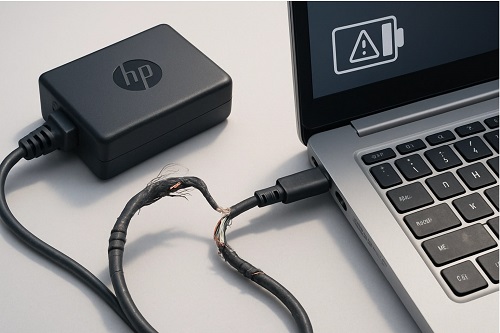
Physical injury risk: it is not an either-or proposition. If you see any exposed conductors, frayed insulation or bent connector pins, replace the charger immediately. Exposed wires and damaged connectors can short, spark or cause electric shock. Popular science safety writeups counsel prompt replacement, not a DIY tape fix, for cords that have frayed.
USB C charger specific issues to look out for
USB C chargers negotiate for the proper voltage and wattage. If a laptop does not support Power Delivery, the charger may simply charge the device extremely slowly or not at all, while warning you that it is slow-charging. Compatibility is everything. A low-wattage USB C charger might suffice for light laptop use, but it cannot support heavy loads or charge power-hungry models. Always get a charger that matches the wattage required by your laptop.
Things you should check before replacing anything
Check the receptacle or power source first. Switch wall plugs and use the charger on a different device that it can accommodate to troubleshoot. Check the cable and connectors for physical damage. If the adapter has an LED, determine if it lights and remains steady. If possible, test with a known-good charger or cable.
Run HP’s battery and adapter diagnostics and follow any error codes they give. This will help isolate the fault to either the adapter, the cord, the outlet or the battery.
When to replace versus repair
If your charging adapter is physically damaged, overly hot, emitting a burnt smell, or making crackling sounds, replace it, especially if diagnostics indicate the adapter has failed. If charging performance is unreliable, consider replacement when switching cables or ports does not improve things. It is generally not worth the effort to try to repair a sealed power brick. Replacements are relatively inexpensive and the risk of using a compromised adapter is not worth saving a few dollars. When still under warranty, manufacturer-authorized replacements are the safest option.
Practical buying tips
Match wattage and connector type. For HP laptops that use a traditional barrel adapter, purchase one that matches the exact voltage and amperage rating specified for your model. For USB C chargers, choose a reputable brand that supports the Power Delivery wattage your laptop requires. Avoid cheap generic USB C chargers that do not fully support USB PD negotiation. A short, high-quality USB C cable rated for the charger’s wattage is a good idea.
Conclusion
An HP charger or a USB C charger that charges slowly, does not keep up, runs consistently hot, is physically damaged, or cannot negotiate power properly is a bad charger. Perform the checks described above to determine where the fault lies. Replace rather than band-aid the adapter or cable if they are at fault. Replacing a cheap charger now can avoid frustration, continued poor battery performance and a potential safety hazard in the future.
FAQ
How many years can an HP laptop charger last and when should I stop using it?
Treated gently, a charger can last several years. Daily bending, tugging or exposure to heat shortens life. When you see fraying, a burning odor or repeated overheating, stop using it at once. Manufacturer diagnostics and common-sense inspections provide your most effective early warnings.
Can I use any USB C charger with my HP laptop?
Not always. With USB C there is a physical connector but power delivery is negotiated. You need a charger that supports the wattage your laptop requires and supports USB-C PD. A low-power USB C charger might allow the laptop to operate but not charge, or it could throttle performance.
Is a flashing light on an HP charger indicative of a fault every time?
No, but it is a clear warning. Blink codes can be generated by the computer, during manual tests or at startup. HP documents specific LED blink codes and how to generate them with various diagnostic tools. If you see blinking while experiencing charging issues, run diagnostics and consider replacing the adapter if diagnostics point to a charger fault.